

AirCodec · Unattended operation
When the studio goes away, the transmitter does not.
A codec at a transmitter site is not a thing anybody is sitting in front of at two in the morning. So it walks its own connection list, falls into emergency programming with a legal ID on the hour, drops the transmitter only if the audio is genuinely dead, keeps testing the studio quietly, and climbs back the moment the studio is stable — and tells the monitoring system every step of the way.
- FallThree connections, in order, then local emergency audio.
- HoldLegal ID at the top of the hour, played clean, with nothing under it.
- Climb backQuiet tests above it; the moment one holds, it goes on air with no gap.
Emergency programming that still identifies on the hour
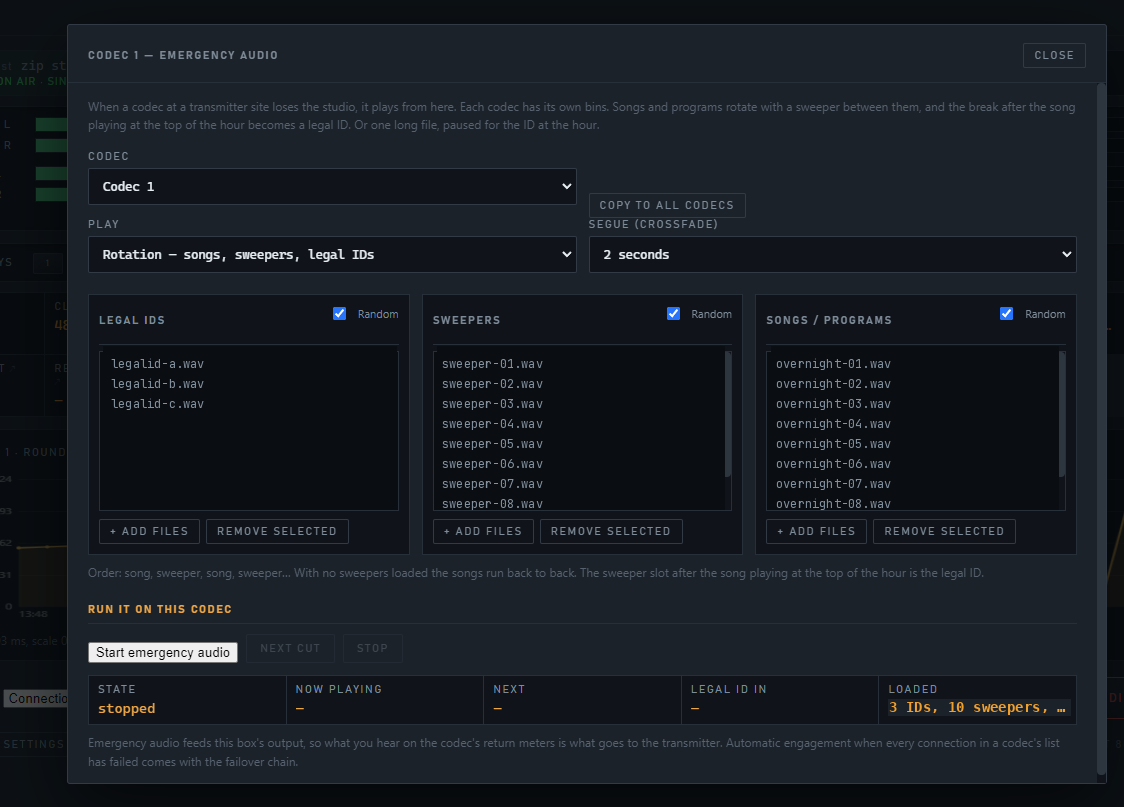
Every codec carries its own emergency programme, loaded on that box, for the day the studio goes away. Not a tone and not a loop of dead air — a rotation that sounds like a radio station, with the legal ID where the rule says it goes.
 Open full size
Or one long file
A show, or a loop, with the legal ID forced at the hour: the file pauses, the ID plays, the file resumes exactly where it was.
One segue setting, not a playout system
Zero to five seconds, equal power, with tail detection — a cut that trails into silence leaves no hole, and a cold ending is not chopped. The operator sees one player, not two decks to learn.
Four ways in
The EMERGENCY AUDIO key, the Profile menu for when everything is dead and you just need it going, a slot in the connection list, or the list falling into it by itself.
It survives a reboot
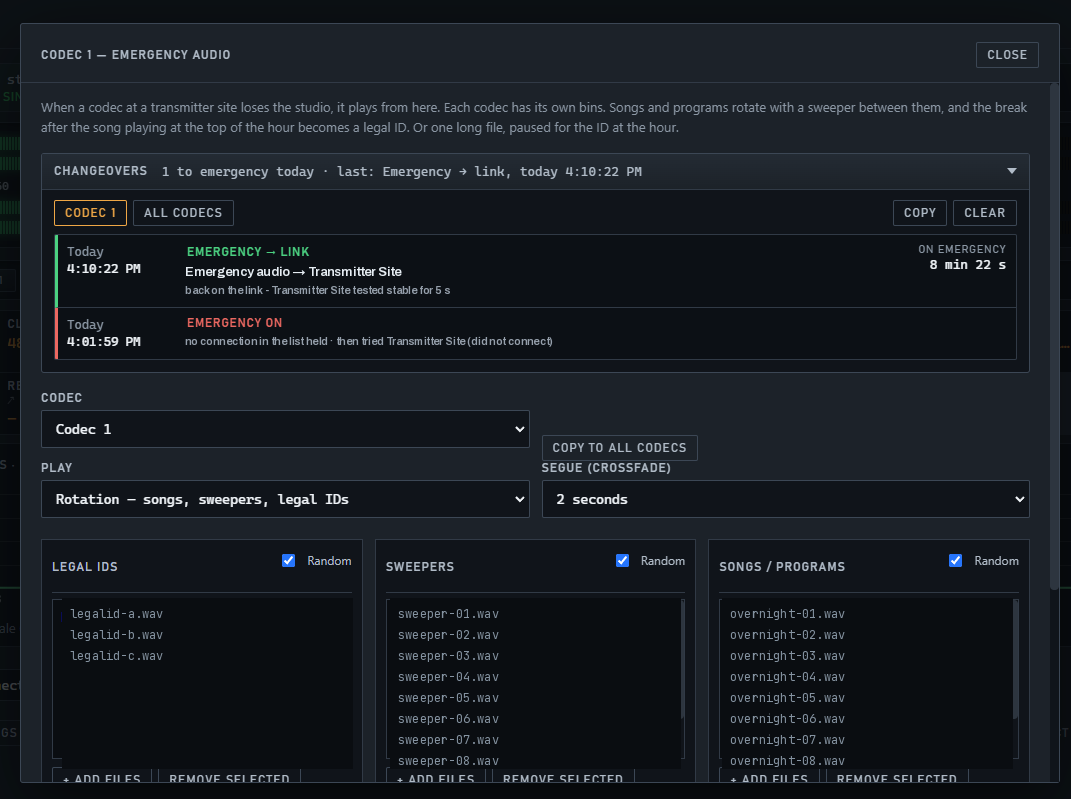
A codec left with emergency audio loaded picks it straight back up when the PC restarts — which is exactly when you are least able to drive out and press a key.
 Open full size
Emergency audio with no legal ID at the top of the hour is illegal audio. §73.1201 asks for identification at the beginning and end of each time of operation and hourly, as close to the hour as feasible, at a natural break — for as long as the station is operating. None of that pauses because the studio link died; the transmitter is still on. A bin of songs and sweepers keeps the carrier modulated and leaves the station unidentified, which is why AirCodec flags no legal ID loaded in red on the box and reports it over SNMP — so you find out before an inspector does.
A ladder it walks down, and climbs back up on its own
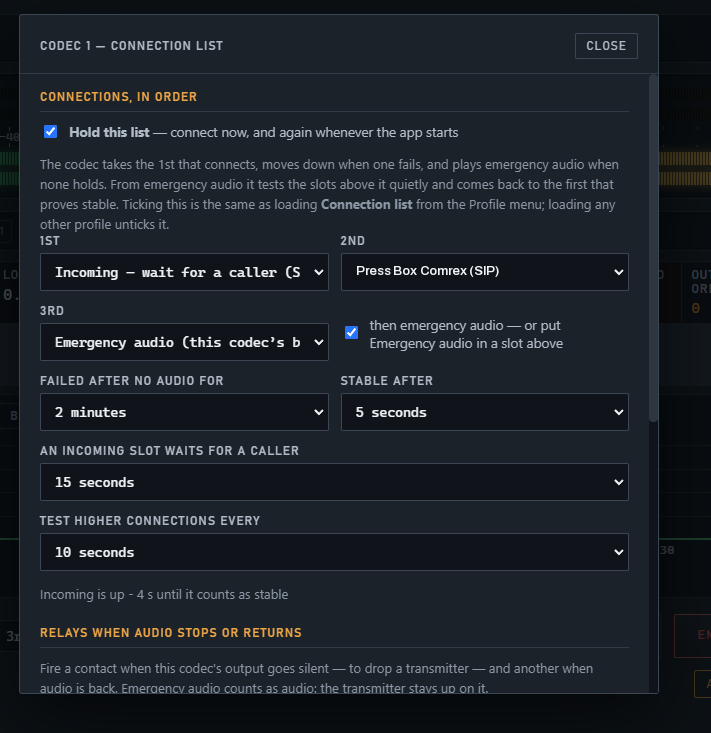
You give the codec three connections in the order you want them. It takes the first that connects. When one fails it moves down. When none of them holds it plays its own programming — and from there it keeps quietly trying the ones above, and goes back to the first that proves stable. Nobody has to be awake for any of it.
The same three slots can be any mix — a Direct link, a SIP call, an incoming slot that waits for a caller, a stream. Emergency audio does not have to be last; put it in a higher slot and the codec stops there instead.
 Open full size
Relays: automation that reaches the other end of the link
A codec that only carries audio leaves half the job undone. AirCodec carries five contact closures each way on the same clock as the programme, so a cue fired at the studio lands at the far end in step with the audio it belongs to — not whenever the network gets round to it.
Press for a pulse, hold for a hold. A closure history at both ends records every one, with the time.
Closures across the link
Five sent and five received per codec, the way the hardware codecs do it — so a remote can fire a cue at the studio and the studio can fire one back.
- A press is a pulse; a hold is a hold
- Carried in time with the audio, not down a side channel
- The RELAYS label says whether they are going over the call at all
- Click RELAYS on the readouts grid for the closure log instead of a graph
The board on the box
A standard eight-output FTDI USB relay board with its 12 V supply, driven by the codec at that site, with test keys in the dialog so you can prove the wiring before you leave.
- Eight outputs for local automation
- Reported over SNMP, including when the board goes missing
- Relay board LOST is its own alert — the contact cannot fire and you find out
Watch the audio, drop the transmitter
Point a codec at its own output and it will take action on silence, with no human in the loop.
- Silent for 5 s to 2 min, then fire — held, or a pulse of 0.5 to 5 s
- On return: release the held relay, pulse another, or do nothing
- Emergency audio counts as audio — the transmitter stays up on it
Lose the internet, act on it
The link going away is itself a condition worth wiring to a contact. A site that must not sit there modulating silence can be taken off; a site that needs its local source brought up can be switched over.
- Fire a relay to take a transmitter off when the programme is truly dead
- Or to bring one up and switch to a local source
- Every one of those moves is written to the activity log and reported over SNMP
With SportsCaster Pro in the field, the same five closures run between the announcer's rig and the studio — so a talent cue, a break marker or a roll command travels the same path as the audio and arrives on the same clock. No second circuit, no separate control link, nothing else to pay for.
What it runs on, and what it does when nobody is there
Requirements
- Windows 10 or 11
- A sound card with a line input and a line output. ASIO is not required. A multi-channel card — Livewire, WheatNet or any multi-channel WDM or ASIO interface — gives each codec its own pair.
- A network connection.
- For the transmitter-site contact: a standard FTDI-based USB relay board with its 12 V supply.
Unattended operation
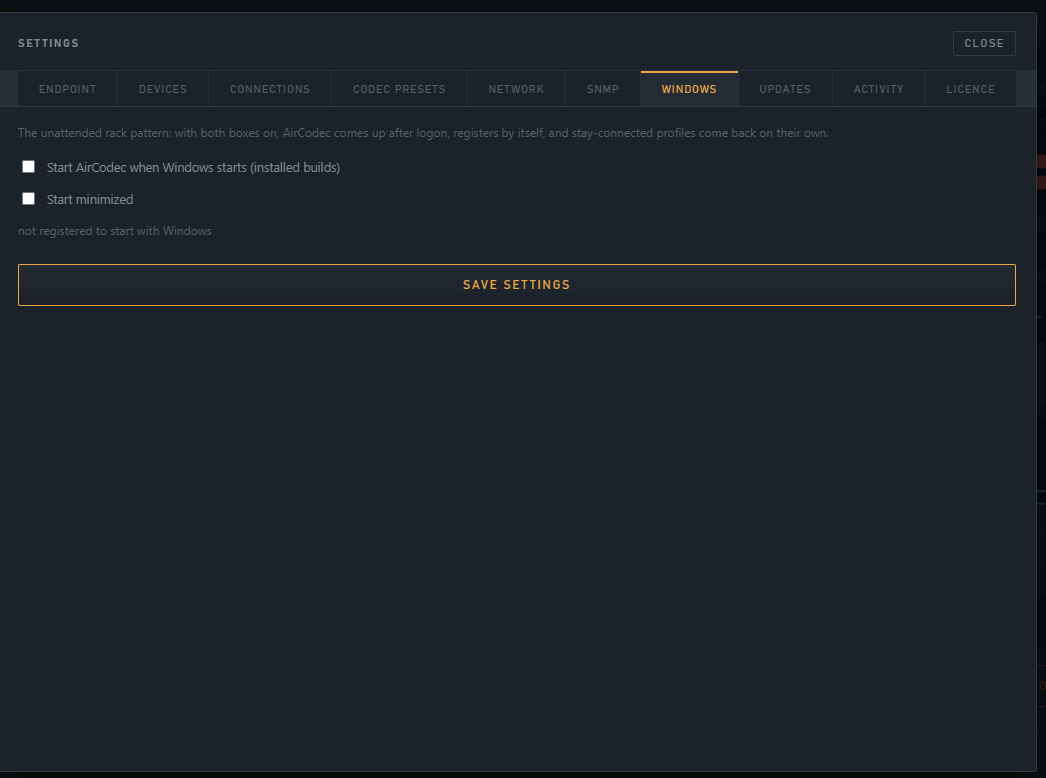
- Starts with Windows, optionally minimized, and auto-connects what was loaded
- Re-arms its listeners and resumes emergency audio if it was left loaded
- Watches its own audio engine as a separate process, reports its build and protocol level, and flags a stale engine in red
- Updates itself from a signed manifest, with the installer run for you
 Open full size
Audio is picked per codec. Each codec has its own line input and line output in its settings, so on a two-channel card they share the one pair — and on a multi-channel card every codec gets its own, and all five can carry their own site at once.
AirCodec
Put one at the transmitter site.
A PC, a sound card and a relay board, and the site rides out a studio failure on its own — identifying on the hour, testing quietly, and climbing back without a drive out at two in the morning.
More on AirCodec