Every connection is saved as a profile — a card you load onto a codec from a menu. The profile carries its transport, its target and its audio codec, so loading it is the whole job. What you pick depends on what is at the other end, and AirCodec covers the three cases a station actually meets.
SIP is dialling. It is the system the entire telephone world moved to, and it does one job: it lets one device find another and agree to talk, without either of them knowing in advance where the other is.
It works the way a phone network works. Every device registers with a server and says here I am, and here is what I am called. When you dial a name, the server looks up where that device actually is right now and introduces the two ends to each other. Then it gets out of the way — the audio runs directly between the two codecs, not through the server.
This is why a remote can be on a hotel network one week and a phone hotspot the next, and still be reached by the same name.
The broadcast version has a name: EBU 3326
SIP on its own is a telephone standard. In the 2000s the European Broadcasting Union sat down with the codec manufacturers — Tieline, Mayah, AETA, Orban among them — and wrote down how broadcast codecs should use it, so that different brands could call each other.
That document is EBU Tech 3326, published in 2007, also known as N/ACIP. It is the reason a Comrex can call a Tieline at all.
How the two ends agree what to send
When the call is set up, each end offers a list of the audio codecs it can handle and they settle on one both understand. 3326 makes a handful mandatory so there is always common ground:
G.711 and G.722 — which is why a plain SIP phone can be a remote
MPEG Layer 2 and linear PCM
Before the standardEvery manufacturer had its own scheme. The box at the far end had to be the same brand as yours, or it was ISDN and a phone call to somebody's engineer.
After the standardA codec is a codec. You buy on merit rather than on what the station across town already owns, and a guest with a SIP phone can be a contributor.
What that means hereAirCodec is a standards SIP endpoint. Nothing at the far end needs an AirCodec licence, a plug-in or a firmware level — if a unit can make an EBU 3326 call today, it can call AirCodec today.
The honest caveat. Not every manufacturer implements all of 3326 — some leave out a mandatory algorithm, and two compliant boxes can still fail to agree if their codec lists do not overlap. That is why AirCodec carries the whole menu rather than a favourite few, and why the connection screen shows you what was actually negotiated instead of making you guess.
Calls go both ways
A codec that can only be called is half a codec. AirCodec dials out, takes calls in, and can answer them on its own — and in every case the thing you type is a name, not an address.
Outbound
It dials anything on the standard
Load a profile and press Connect. AirCodec places the call the way a hardware codec does, so the far end does not need to know what it is talking to — a Comrex at the stadium answers an AirCodec exactly as it would answer another Comrex.
Inbound
Anything on the standard dials it
Each codec holds its own name on the account, so a remote dials the channel it wants rather than a shared number somebody then has to patch. Five codecs, five names — an incoming call lands where it was aimed.
Unattended
Auto answer, per codec
Turn it on for the codec that has to pick up and an unattended site takes the call with nobody there. Optionally ring first for a set time before answering, so a studio can grab it by hand if somebody is in.
Why the name matters. An address changes when a remote moves hotel, when a site gets a new circuit, when a carrier rotates it overnight. A name does not. Both ends register with the server, the server keeps track of where each one actually is, and the call finds it.
It speaks the same standard as
Any EBU 3326 / SIP device can call AirCodec, and AirCodec can call it. That includes:
On a RØDECaster, SIP calling comes with the CallMe Pro tier — the free tier connects RØDECaster to RØDECaster and web guests only.
Broadcast codecs
SportsCaster Pro
Comrex ACCESS
Comrex BRIC-Link
GatesAir Intraplex IP Link
Another AirCodec
Tieline ViA
Tieline Gateway
Tieline Merlin
Tieline Bridge-IT
AEQ Phoenix Venus
AEQ Phoenix Mercury
AEQ Phoenix Studio
AETA Scoopy+
AETA ScoopTeam
Mayah Centauri
Mayah GeMINI
AVT MAGIC ACip3
AVT MAGIC AC1
Prodys Quantum
Prodys Ikusnet
Digigram Iqoya
LUCI Live
ipDTL
RØDECaster Pro II
RØDECaster Duo
and more
SIP phones and softphones with G.722
Grandstream
Yealink
Snom
Poly
Cisco
Mitel
Avaya
Fanvil
Htek
Akuvox
Gigaset
Sangoma
Alcatel
VTech
Linphone
Zoiper
Bria
MicroSIP
Jitsi
3CX
Groundwire
Acrobits
and more
SIP credentials you don't have to invent
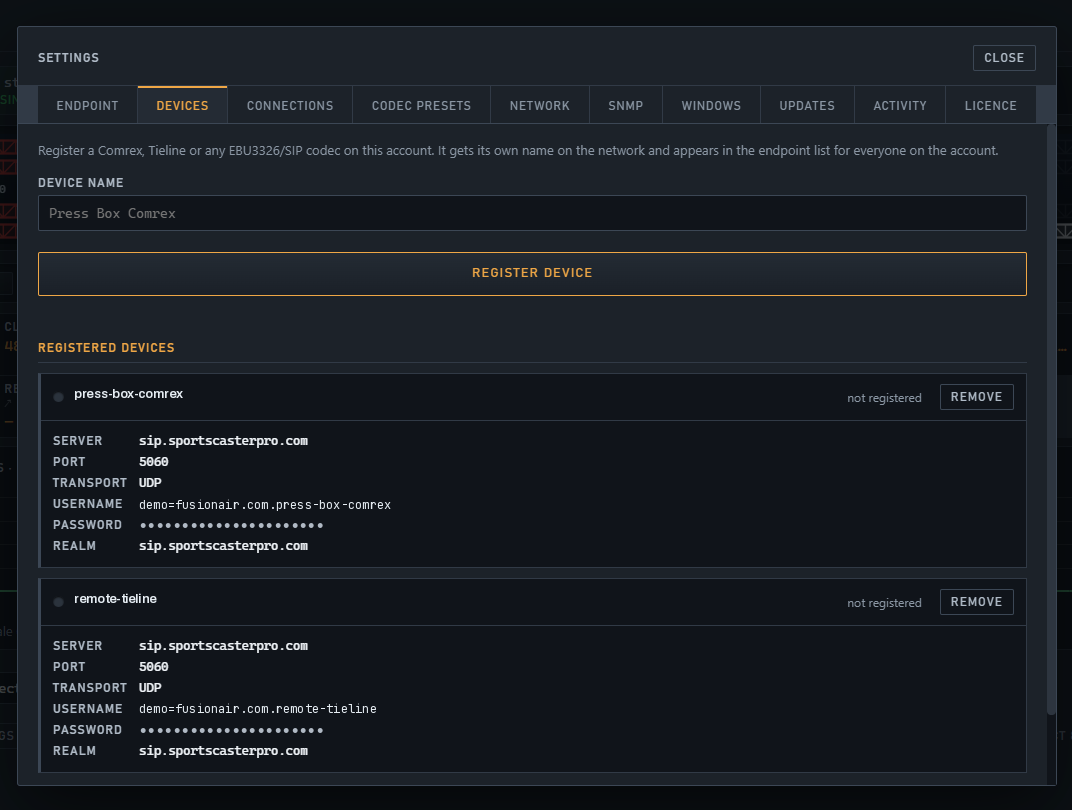
Putting a hardware codec on a SIP network usually means somebody picks a username, picks a realm, picks a password, and gets one of them subtly wrong. AirCodec issues them instead. Name the unit, press Register device, and the server hands back the exact server, port, transport, username, password and realm — ready to type into the box once.
1
Name the unit
Settings → Devices. Type what the thing is called — press-box-comrex, remote-tieline — and press Register device.
2
The server issues the credentials
They come straight back on screen: server, port, transport, username, password, realm. Nothing to invent and nothing to agree with anybody — they are generated against your account.
3
Type them into the box, once
Enter them in the Comrex or Tieline's own SIP settings and it registers. That is the only time anybody types a credential — AirCodec's own five codecs are provisioned and never need it at all.
4
After that, it is a name
The unit joins the endpoint list for everyone on the account and is dialled by name from a profile. Move it to another building and the name still finds it.
Open full sizeName the unit, press Register device, and the details it needs come straight back — ready to type into the box itself.
Standards, not a walled garden. SIP is how the hardware already works, so nothing at the far end needs an AirCodec licence, a plug-in or a firmware level. If a unit can make an EBU 3326 call today, it can call AirCodec today.
SIP buys you interoperability. Direct buys you the studio-to-transmitter link on a bad night. It is AirCodec to AirCodec, point to point over RIST, with no registrar in the middle and nothing to negotiate — because both ends are the same software and already agree.
That is what lets it do things a standards call cannot: correct errors in both directions independently, ask again for a packet that went missing, carry your contact closures in step with the audio, refuse a caller who cannot produce a password, and encrypt the whole thing.
One link carries the programme, the automation and the station data — behind an address list and a password, on ports derived per codec rather than a page of firewall rules.
Two ways to survive a bad network
A standards call has one answer to packet loss: live with it. Direct has two, and uses whichever fits the moment.
Forward error correction — spare data rides along so the far end rebuilds what went missing without asking
Retransmission — where there is time in the buffer, the missing packet is simply requested again
Set per connection and per direction, because the send and the return rarely cross the same network
A password on the door
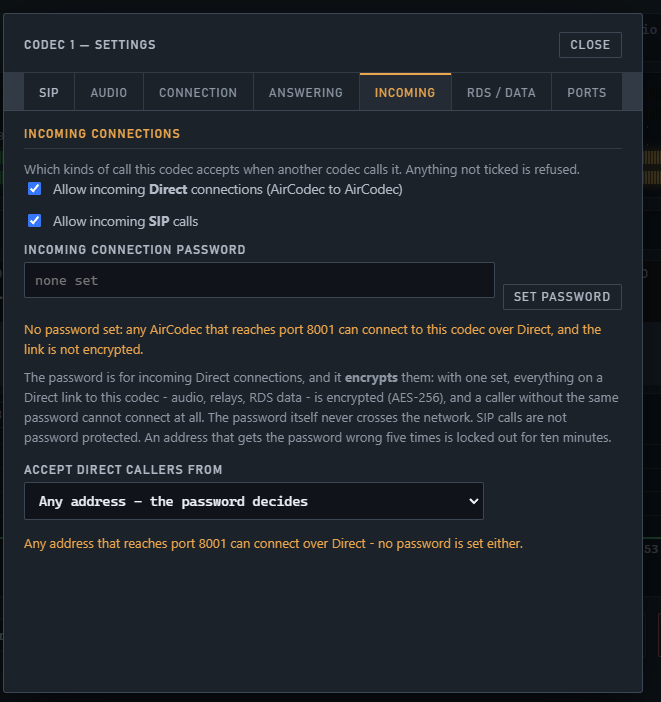
An incoming Direct link either carries the connection password or it does not. Without it there is no session and no audio, and the refusal is logged with the address it came from.
Checked before the session is established
The password itself never crosses the network
Five wrong tries and that address is locked out for ten minutes — so nobody sits there guessing
Set per codec, so one channel can be open and another shut
And a list of who may even try
Before the password is reached, the caller has to be an address you allow. Accept Direct callers from takes as many entries as you need — and anything not on the list never gets as far as a password prompt.
Single addresses — the studio, the other transmitter site
Whole subnets or blocks — the engineering network, a site range
Any address, and let the password decide, when a remote could be anywhere
Decide what the codec answers at all
Per codec, you choose which kinds of call it will take: incoming Direct, incoming SIP, either, or neither. Anything not ticked is refused outright — a codec that only ever dials out need not listen for anything.
A transmitter-site codec can take Direct from the studio and nothing else
A guest channel can take SIP calls and no Direct at all
Encrypted, with the audio
Set that password and the link is encrypted with AES-256 — the programme, the contact closures and the RDS data together, as one protected stream across the public internet.
Nothing extra to configure, no certificate to renew
Nothing else on the path can read what you are sending
Send and return need not match
A Direct link allows a separate receive-side codec. Run a heavy codec down to the transmitter and something lean on the way back, or more correction on the leg that needs it and none on the leg that does not.
Per-session statistics for each direction
Each codec gets its own derived port pair — no five-page port worksheet
Open full sizeOne tab per codec: what it answers, the password that encrypts the link, and the list of addresses allowed to try.
SIP callDirect link
Talks toAny brand on the standardAnother AirCodec
Packet lossWhatever both ends agreedCorrection and retransmission, per direction
Access controlRegistration on the serverAddress list, then password, then lockout
EncryptionNot applied by AirCodecAES-256 with the password set
Contact closuresOver the call where supportedFive each way, in time with the audio
RDS and data—Carried on the same link
Best forRemotes, guests, other people's gearStudio to transmitter, site to site
Use both. Nothing makes you choose. A connection list can hold a Direct link as the first slot and a SIP call as the backup, so the link that has to hold is the one that normally carries you — and when it goes, the standards call picks it up.
Sometimes the thing you need is already running and has no interest in being dialled: a programme stream on a server, a Barix box screwed to a wall, a legacy unit that only knows one address. Each of those is a transport you pick from the same menu, and once it is loaded the codec treats it like any other connection.
Stream
Pull a feed in as the audio
Point a codec at an HTTP, Icecast or Shoutcast stream and it arrives as that codec's audio — MP3 and the rest. No call, no far end to configure, nothing to answer.
A network feed or syndicated programme arriving like any other connection
A backup programme source sitting in the connection list behind the main link
Buffer before starting and a buffer limit, so a stuttering server does not take you with it
Barix
Send to it, take from it, or both
Send the line input to a Barix box as a plain RTP push, or over Barix's own subscribe-based BRTP; receive from one; or run both directions at once.
For Exstreamer and Instreamer installations already in the plant
Keeps the boxes you have rather than replacing them
RTP
Straight to an address
Plain RTP where the far end is fixed and does not dial, with a Comrex preset that fills in what a Comrex expects so you are not guessing payload types and ports.
For legacy and fixed-address gear
No registrar involved, nothing to look up
Loopback
Codec 1 to codec 2, same box
A loopback is a connection like any other: two instances on the same machine linked over Direct. For proving a path before the show, and for routing audio around the building.
Bench testing without a second site
Local routing between two codecs on the one machine
Mix them in one list. The connection list takes three slots in order, and they do not have to be the same kind. A Direct link first, a SIP call second, a stream third — so when the good path goes, the codec works its way down whatever you have, and comes back up the moment the first one proves stable again.
Through the firewall, the way the hardware does it
A remote is usually on somebody else's network. AirCodec handles that with the same tricks the wall-mounted units use, so a studio engineer is not on the phone to a hotel's IT department before a game.
UPnP
On a home or small-office router, AirCodec opens the ports it needs by itself and closes them again. Nothing to configure at the remote end.
Symmetric RTP
Audio is returned to the address and port the call actually arrived from, rather than the one the far end claimed. That is what gets audio back through a NAT that rewrote it on the way out.
Contact rewriting
The registration is corrected to the address the server really sees, so a codec behind NAT stays reachable by name.
Direct links
Where UPnP is not available — a managed corporate network, a transmitter site behind a proper firewall — a Direct link needs one forwarded port pair per codec. Ports are derived automatically; nobody types five sets of them.
Direct and RTP ports are derived per codec · no five-page port worksheet
AirCodec
Tell us what is on the other end.
A Comrex at the stadium, a Barix at the transmitter, a laptop in a press box, or all three on the same account. Say what you are trying to link and we will tell you straight whether AirCodec does it.