



The new FCC password rule is only about 30% of the problem.
AirScan finds the other 70%.
Read our article on the other 70% →
From what we see on station networks, the other 70% is everything a password can't fix: RDS encoders open to the internet, firewalls and VPNs nobody has patched, remote controls still on their factory settings, and the doors a previous engineer opened and nobody ever closed.
Hackers already know what's open on your network. Do you?
Read our article on how insecure the internet really is →
Already have an account? Sign in
Yes. It's safe to run.
Hackers are already scanning your external network. They do it every day, around the clock, looking for anything that answers. AirScan does the same thing. The difference is that we have no malicious intent, and we hand you the log of everything we found.
AirScan looks at your station from the outside and nothing more. It never logs in, attempts a password, or sends a command. It never changes your settings or interferes with your audio or RDS. Run it in the middle of a live show and nothing changes on your end.
If your firewall blocks it, that counts as a pass.
Read our article on how insecure the internet really is →From the FusionAir engineering team / Matt Aaron
Pick what you want to know.
AirScan looks at your station the way the internet does, tells you what is reachable and what to do about it, and leaves you with a record you can put in the file. Free, read-only, and built for broadcast gear rather than office networks.
Your gear is a target — and the password isn't the point.
The equipment that puts you on the air — STL links, codecs, RDS encoders, EAS boxes, transmitter remotes — was built for a private studio network. Put it on a public connection and its control interface answers anyone on the internet who goes looking.
And attackers are looking. In the last few years, stations have had their RDS text rewritten, their audio paths hijacked, and fake alert tones pushed on air — through gear that was simply reachable. In most of those cases, the attacker never had to crack a password. The door was already open.
That's the whole point of AirScan. Change your passwords, yes — but first find out what a stranger can actually reach, and close it.
The rule is the floor. We show you the door.
FCC §11.35(d) asks for three things
AirScan is built around the third one — the control that every incident above keeps coming back to. It shows you exactly what's reachable from outside your plant, so "behind a firewall" stops being a line you tick on a form and becomes something you can actually see, fix, and prove. That's going past the minimum — which is the point.
Your network was built by people who aren't there anymore.
Every engineer, contractor and IT company that has worked on your station left something behind. A port forwarded so the remote control could be reached from home. A VPN account for a board op. A new router with the old settings copied straight across.
None of it was wrong at the time. Most of it was never written down, and nobody has gone back to check what is still open. That's what AirScan is for.
- Transmitter remote controlCLOSEDOPENFOUND
- VPNCLOSEDOPENFOUND
- RDS encoderCLOSEDOPENFOUND
- STL codecCLOSED
- Router / firewallCLOSEDUNPATCHEDFOUND
-
A transmitter site isn't an office.
Nobody from IT walks through it. The router came with the internet line, the firewall may not have been touched since the day it went in, and the gear in the rack was built for a private network, not the open internet. It's supposed to run for years without anyone looking at it. That's the point of it, and that's the problem.
-
Your IT company covers the office, not the tower.
The people who keep the front-office computers patched often never see the transmitter site, the STL or the broadcast side of the studio. Everybody owns a piece. Nobody looks at the whole thing from the outside.
-
A password doesn't close an open door.
The new FCC rule has everyone changing passwords, and they should. But a strong password does nothing for an RDS encoder that takes commands from anyone, or a VPN with a known hole that skips the login entirely.
-
If it's open, assume it's been found.
Automated scanners sweep every public address on the internet, around the clock. Whatever is open on your network, assume they've already seen it. AirScan shows you the same list, so you can close it before someone uses it.
The only way to know what's open is to look from the outside.
Run AirScan from a computer at the studio. If the transmitter site has its own internet line, run it from a computer there too. That's a different door. It's free, it's read-only, and it's safe to run in the middle of a live show.
And the 30%? We made that the easy part.
The new rule still has to be met, and when someone asks, you'll want it in writing. These two free tools take care of both.
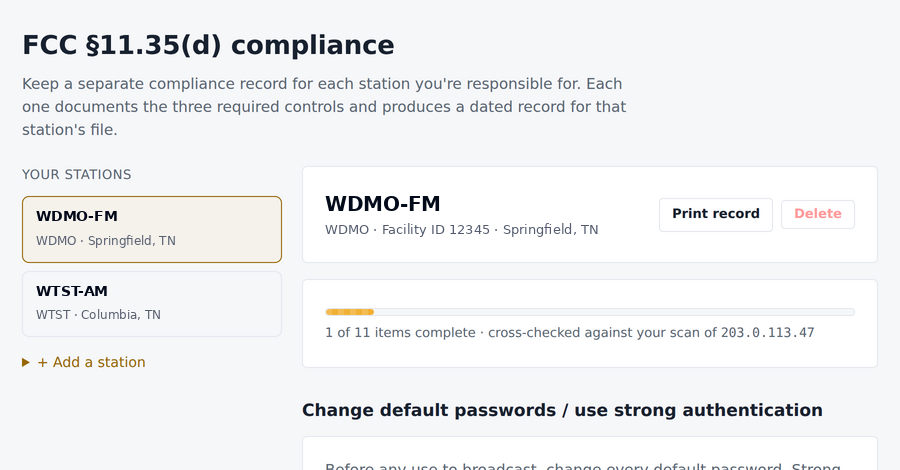
Your §11.35(d) record, station by station.
Work through the three controls the rule asks for, one station at a time, with its call sign, facility ID, city and state. AirScan checks your answers against your latest scan, so the record says what is actually true, not just what got ticked. Then print a dated copy for the station file.
- A separate record for every station you look after
- Checked against what your scan really found
- Printed and dated, ready for the file
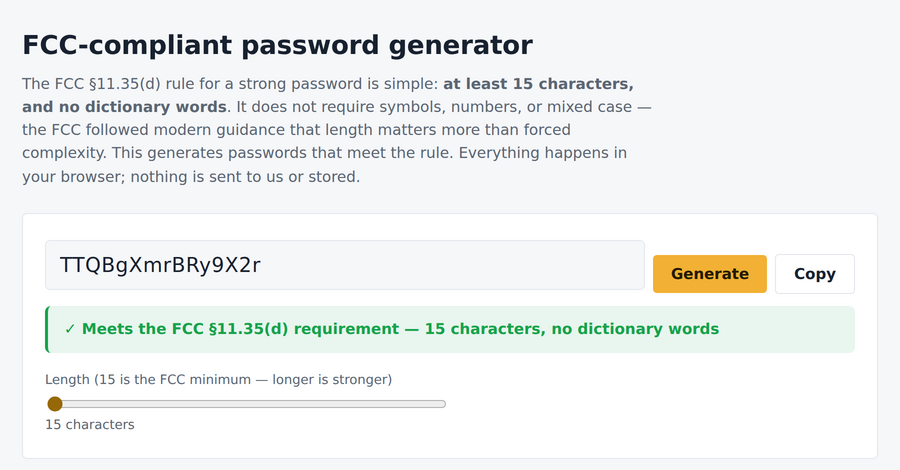
Passwords that pass the rule, in one click.
The rule is simpler than most people think: at least 15 characters and no dictionary words. It doesn't ask for symbols, numbers or mixed case, because length matters more than forced complexity. Make new passwords that pass, and check the ones already on your gear. It all runs in your browser. Nothing is sent to us, and nothing is stored.
- 15 characters, no dictionary words
- Check the passwords you already use
- Never leaves your browser