

AirCodec · Monitoring
Your NMS sees the codec, not just the PC it runs on.
AirCodec carries a full SNMP v2c agent with its own MIB, built for Broadcast Network Monitor and for any NMS that can load a MIB file. Every codec is a row; everything the window shows an operator, an NMS can poll — and the eighteen things worth waking somebody for are traps.
AIRCODEC-MIB · enterprise .55555.21
AirCodec + Broadcast Network Monitor
Built for Broadcast Network Monitor
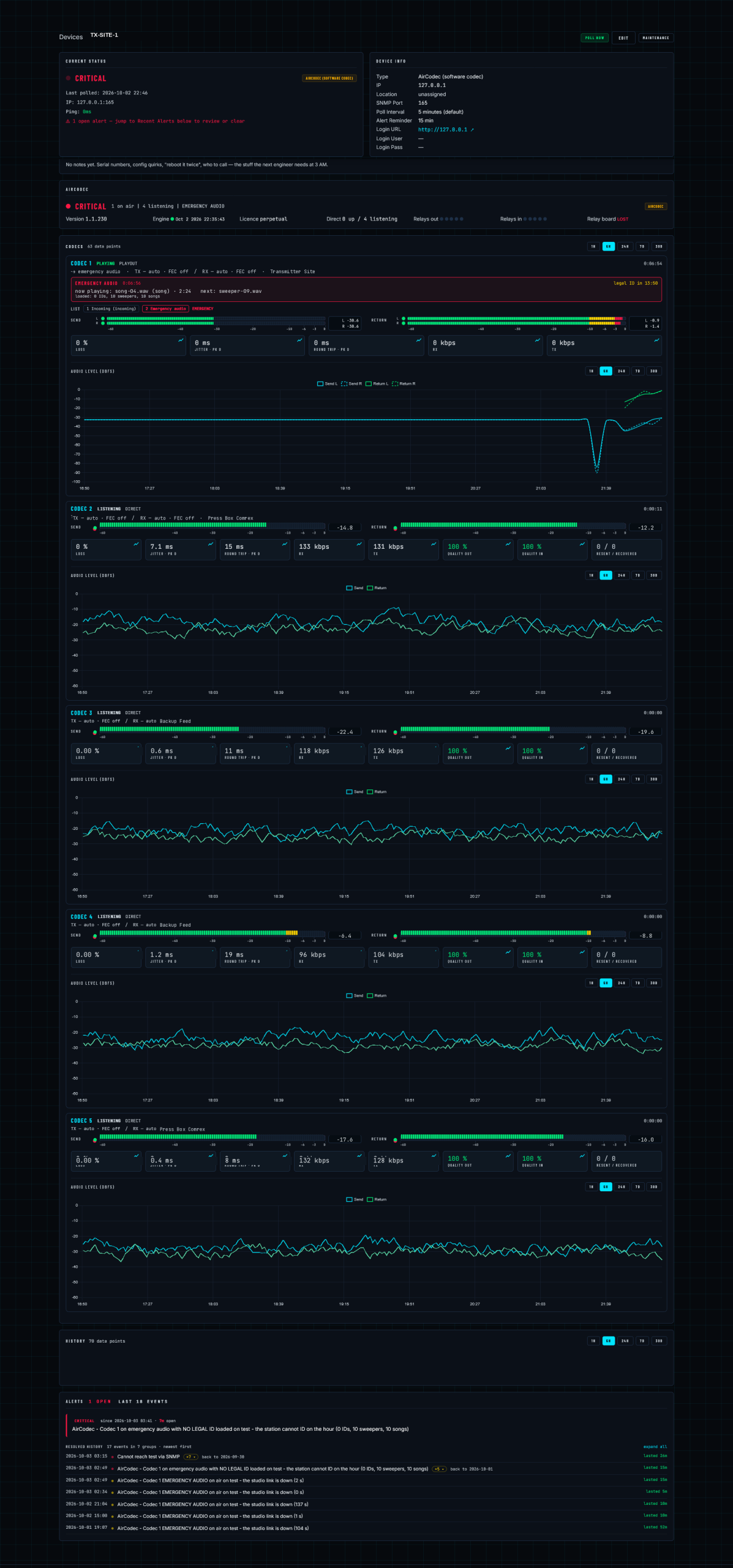
AirCodec and Broadcast Network Monitor are built by the same people, and BNM already knows what an AirCodec is — it is a device type with its own page, its own alert rules and its own history. More to the point, BNM watches the site from outside it. Any other NMS will poll the agent too; this is the one that will wake somebody up.
 Open full size
It becomes a device on the board
No MIB wrangling, no OID spreadsheets, no building a dashboard. AirCodec shows up as a device type BNM already has a page for.
- A page per codec — state, levels, loss, jitter, round trip, rates, all five at once
- Alerts that know the product — not "OID went non-zero" but emergency audio is on air, the studio link is down
- Dial-outs and escalation — the same contact rules, schedules and acknowledgement as the rest of the plant
- History kept beyond the 24 hours the codec holds on disk
- Work orders raised off an alert, with the device notes attached
Poll it like a transmitter
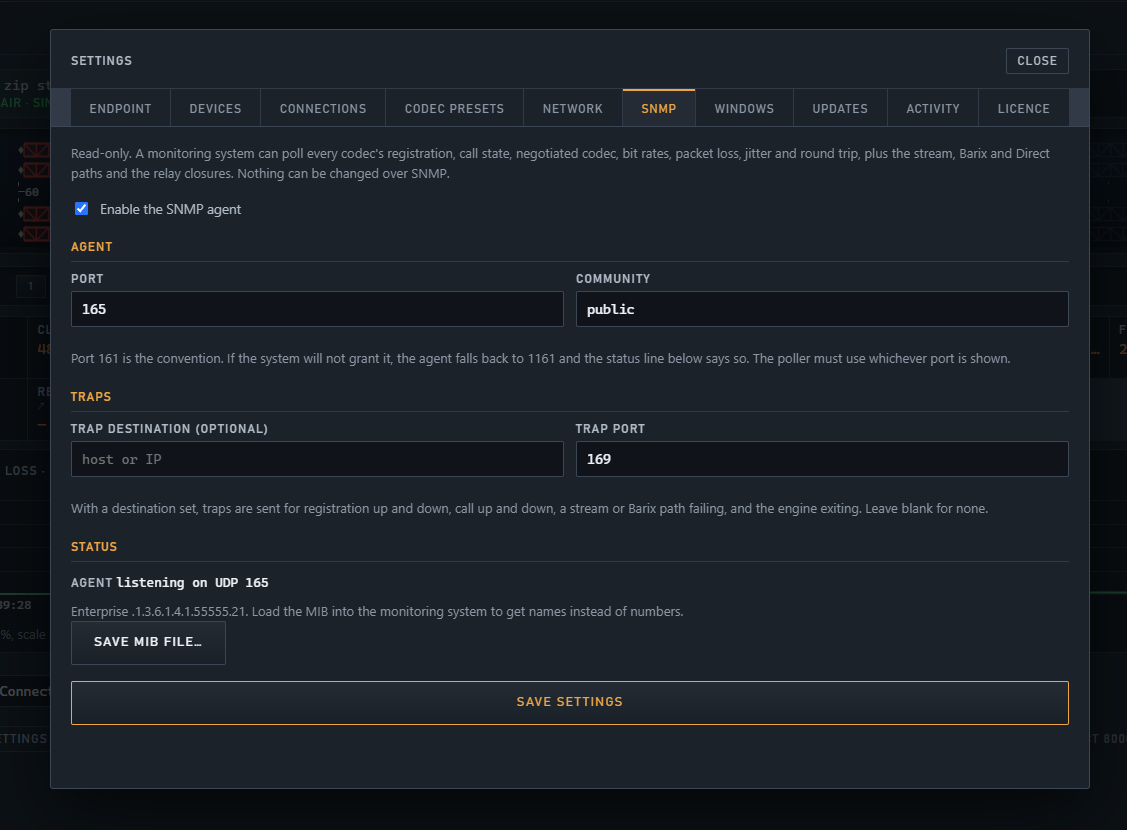
Nothing proprietary, nothing to license. Point your monitoring system at the agent and it reads everything the operator can see.
- SNMP v2c, your port and community
- 73 columns per codec across five rows
- 18 traps to a destination you set
- Read only — nothing can be changed over SNMP
- Save the MIB straight out of the SNMP tab
What an AirCodec alert actually says
Codec 1 emergency audio on air — the studio link is down
Codec 1 on emergency audio with no legal ID loaded — the station is on the air unidentified
Cannot reach the codec via SNMP
Relay board lost — the transmitter contact cannot fire
AirCodec has no mail client, on purpose. A codec that has lost its internet cannot send you an email — the one message you needed most is the one that never leaves the building, and a product that pretends otherwise is selling you a warning that arrives only when nothing is wrong. An alert has to originate somewhere that still has a network, looking in at the site from outside. That is what BNM is for: it notices the silence, because silence is exactly what it is watching for.
Each one resolves itself when the condition clears, and the duration is kept. That second line is the one worth having. A codec quietly running emergency programming with no legal ID loaded is a licence problem that no generic SNMP threshold will ever catch — because nothing is down, nothing is red, and the transmitter is happily modulating.
Poll it like any other device in the plant
The row for a codec is not a cut-down summary. It is the same information the operator is looking at, in a form your monitoring system can trend, alert on and keep.
 Open full size
On every codec row
- The link — transport, state, registration, far end, codec and bit rate each way, FEC
- The path — packet, byte and loss counters, jitter and round trip with their peaks, retransmitted and recovered, link quality
- The audio — send and return level per channel with an audio-present flag, so a dead channel shows as a dead channel rather than a quiet one
- The plumbing — ports, loaded connection
- The list — which phase and which slot, and what is being tested right now
- Emergency audio — whether it is on and for how long, the cut playing, its kind and position, the next cut, the seconds until the legal ID, and what is loaded
- The watch — the audio watch and the relay it is holding
Scalars, once per box
- App version, engine build and protocol level — and whether the engine is stale
- Licence state
- Registrar
- Stream, Barix and Direct summaries
- The ten contact closures
- UPnP
- The USB relay board and the state of its outputs
Eighteen traps
- Engine exit
- Registration up
- Registration down
- Call up
- Call down
- Stream failure
- Barix failure
- Direct up
- Direct down
- Audio silent
- Audio restored
- Stale engine
- Emergency audio on
- Emergency audio off
- List step change
- Audio watch lost
- Audio watch restored
- Relay board found / lost
With Broadcast Network Monitor the codec appears as a device like any transmitter or switch — its own page, its own alert rules, its own history — so a studio-to-transmitter link that has quietly fallen to its second slot shows up on the same board as everything else at that site.
AirCodec
Want the MIB before you commit?
Load AIRCODEC-MIB into your NMS and look at what it actually exposes. Ask and we will send it over.
More on AirCodec