

Leave the papers at home.
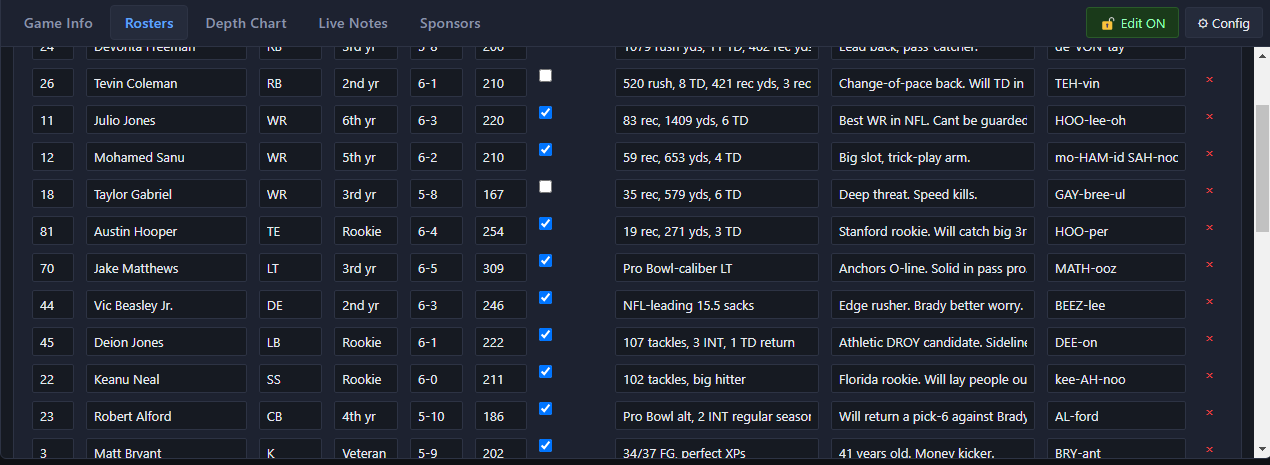
Game notes, rosters, depth charts and sponsor reads usually ride along on paper. SportsCaster Pro keeps all of it on the same screen as the board, in five tabs right under the cart deck.
Game Info
The teams and their records, the date and venue, the standings and what's at stake, the last meeting, the weather and your storylines.
Rosters
Home and away, with numbers, positions, stats, notes and a pronunciation for every name.
Depth Chart
Starters and backups at every position, set before the game.
Live Notes
Play-by-play notes, logged as the game happens.
Sponsors
The sponsor reads for the broadcast, right where the announcer can see them.
From the spreadsheet to the broadcast and back
Prep it in a spreadsheet
One Excel file with a sheet for each tab. Start from the blank template.
Import before the game
Everything lands in the tabs at once. Save the game as a profile to load again later.
Use it on the air
Edit as the game goes, or switch to View Only so nothing changes by accident.
Export for the record
Send the whole game back out to a spreadsheet when you're done.
Every field is free-form, so it works for whatever sport you call.
SportsCaster Pro
$599
The whole remote kit on one PC, in two-channel and four-channel versions.
Requires a Behringer UMC or Focusrite Scarlett audio interface.See which models

SportsCaster Pro works with the interface through ASIO®. ASIO is a trademark of Steinberg Media Technologies GmbH, registered in Europe and other countries.